
Beyond WCAG Compliance: Alternative Formats for Web Content
Under the Americans with Disabilities Act (ADA) and Section 508 of the Rehabilitation Act, organizations are increasingly required to ensure their digital content is usable by individuals with disabilities. This can sometimes mean going above and beyond WCAG compliance on the site.
While adhering to Web Content Accessibility Guidelines (WCAG) for standard HTML pages is the baseline, accessibility sometimes requires providing content in alternative formats. These formats ensure that information is accessible to users who cannot perceive or interact with standard web layouts due to visual, auditory, cognitive, or motor impairments.
Providing alternative formats mitigates the potential for discrimination while simultaneously expanding the reach of communication to the 26% of adults in the United States who live with some form of disability. This post details the technical requirements and strategic implementation of critical alternative formats: accessible PDFs, large print documents, Braille transcripts, audio recordings, and text transcripts.
Accessible PDFs: Compliance Beyond the "Save As" Button
Portable Document Format (PDF) files are ubiquitous in business and government for maintaining document fidelity across platforms. However, a standard PDF is frequently a "digital image" of text, rendering it completely invisible to screen readers used by blind or low-vision individuals.
To be considered accessible, a PDF must adhere to the PDF/UA (Universal Accessibility) ISO 14289 standard. This requires more than simply exporting a Word document. It involves a file that contains a hidden layer of structural tags.
Key Technical Requirements for PDF Accessibility
Tag Tree Structure: The document must possess a logical tag tree that defines headings, paragraphs, lists, and tables. This allows assistive technology to determine the reading order and hierarchy of the content.
Alternative Text: All non-text content, including images, charts, and graphs, must have descriptive alternative text (alt text) that conveys the meaningful information of the visual element.
Reading Order: The visual layout of a PDF does not always match the programmatic reading order. Remediation ensures that a screen reader articulates the content in a logical sequence, rather than reading across columns incoherently.
Table Structure: Data tables must be tagged with proper row and column headers to allow users to navigate complex data grids without losing context.
Large Print Documents: Visual Clarity for Low Vision Users
While web browsers allow users to zoom in, specialized large print documents are distinct from simply magnifying a standard page. Large print formatting is designed specifically for individuals with low vision who do not use screen readers but require enhanced visual clarity to read comfortably.
Creating a large print alternative involves redesigning the document layout to maximize readability. This format is particularly relevant for downloadable resources, instructional guides, and essential correspondence.
Standards for Effective Large Print
Font Size: The minimum standard for large print is generally considered to be 18-point font. However, distinct clarity is often best achieved at 20-point or 24-point sizing.
Typeface Selection: Sans-serif fonts (such as Arial, Verdana, or Helvetica) are mandatory. Serif fonts have decorative strokes that can blur or distort visuals for individuals with visual impairments.
High Contrast: Text must have a high contrast ratio against the background. Black text on a white or light yellow background is the industry standard.
Layout Simplicity: Columns should be avoided. Text should run in a single column to prevent the user from having to track complex layouts. Margins should be at least one inch to facilitate holding the document without covering text.
By offering a dedicated large print version of vital documents, organizations demonstrate a granular understanding of user needs, accommodating those who fall in the gap between standard vision and total blindness.
Braille Transcripts: Bridging the Digital and Tactile
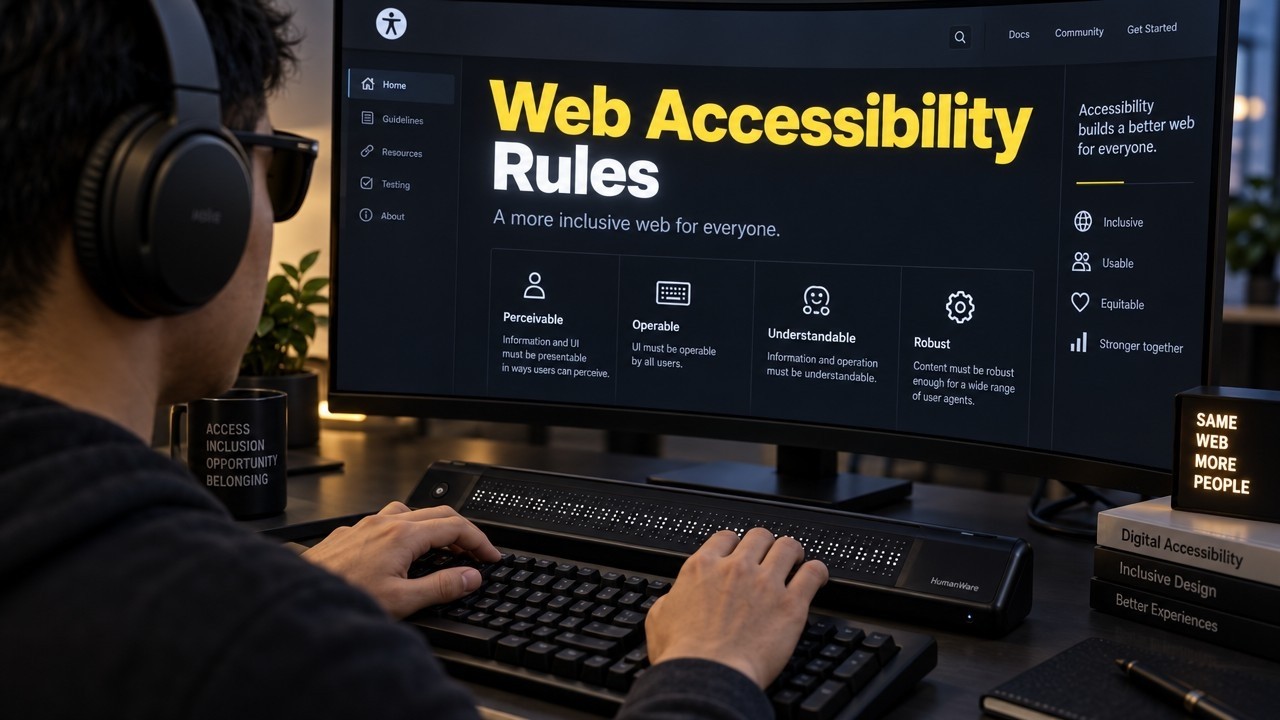
Braille remains the primary literacy medium for many individuals who are blind or deaf-blind. While screen readers provide audio access, Braille offers precise engagement with spelling, punctuation, and formatting that audio cannot replicate. In the digital age, Braille transcripts are typically delivered as Braille Ready Files (.brf).
A .brf file is a specialized digital text file that can be read on a refreshable Braille display—a device that raises and lowers pins to form Braille characters dynamically. It can also be sent to a Braille embosser to print a hard copy.
Implementation Considerations
Formatting Codes: Converting text to Braille is not a simple transliteration. It requires specialized translation software to apply the correct formatting codes for Grade 1 (uncontracted) or Grade 2 (contracted) Braille.
Visual Descriptions: Similar to alt text in PDFs, any images or diagrams in the source text must be converted into comprehensive text descriptions within the Braille file so the user receives the full context.
Navigation: The file must include formatting for page numbers and headings to allow the user to navigate the document using the keys on their Braille display.
Providing .brf files on request for lengthy reports, contracts, or educational materials ensures that blind users can interact with the content deeply and independently.
Audio Recordings: Auditory Access to Text Content
Audio recordings of text content serve a broad demographic, including individuals with visual impairments, learning disabilities like dyslexia, and limited literacy skills. While screen readers generate synthetic speech (Text-to-Speech or TTS), pre-recorded audio offers a higher level of comprehension and engagement, particularly for complex or nuanced narratives.
Human vs. Synthetic Audio
Synthetic Audio (TTS): Automated tools can instantly convert text to speech. While cost-effective, they often lack correct intonation, mispronounce proper nouns, and struggle with homographs (words spelled the same but pronounced differently).
Human Narration: Professional voice talent provides proper pacing, emphasis, and emotional tone. For high-value content such as mission statements, detailed case studies, or patient information, human narration ensures the message is conveyed accurately.
When hosting audio recordings, it is critical to provide an accessible media player that can be operated via keyboard controls. Furthermore, the audio interface itself must be labeled correctly for screen reader users to locate the play, pause, and volume controls.
Text Transcripts: Essential for Audio-Visual Media
For users who are Deaf or Hard of Hearing, audio content is inaccessible without a textual alternative. Text transcripts provide a verbatim written record of audio-only content (like podcasts) or the audio track of video content.
It is important to distinguish between captions and transcripts:
Captions: Synchronized text that appears on screen with the video.
Transcripts: A separate, static document containing the text of the audio.
Elements of a Compliant Transcript
A professional transcript must include more than just spoken dialogue to be truly equivalent to the audio experience:
Speaker Identification: Clearly label who is speaking, especially when there are multiple participants.
Non-Speech Sounds: meaningful sound effects (e.g., [door slams], [upbeat music plays], [silence]) must be included to convey the full atmosphere and context of the media.
Time Stamps: Including time stamps at regular intervals allows users to cross-reference the text with the specific point in the audio file.
Transcripts should be linked directly adjacent to the media file. Beyond accessibility, transcripts significantly boost Search Engine Optimization (SEO) by making audio content crawlable by search engines.



















Коли хочеться мати під рукою кілька різнопланових сайтів, така добірка досить зручна. Теми про дім, сад і побут можна переглянути на цьому вебсайті, а для сучасних цифрових сервісів і техніки перейти сюди. Практичні поради для повсякденних справ часто можна знайти на сайті, а матеріали про догляд, здоров’я, красу та стосунки — за цим посиланням, тому всі чотири ресурси зручно використовувати залежно від конкретної теми.
На цьому ресурсі можна натрапити на статті, які допомагають швидше розібратися у певному питанні або просто дізнатися щось нове. Тематика досить широка, тому сайт не прив’язаний лише до одного напряму. Частина матеріалів має практичний характер і може стати у пригоді в конкретній життєвій ситуації.
Мені подобається формат ресурсів, де після однієї корисної статті можна знайти ще кілька матеріалів на зовсім інші теми. На Infosaray саме така структура, адже сайт поєднує побутові, сімейні, фінансові та технологічні напрямки.